
Download PDFBinder – merge PDF, PDF merger, combine PDFs, PDF tool, PDF utility, PDF management, free PDF tool, PDF organizer, PDF document, PDF file
Overview
PDFBinder is a streamlined mobile application designed to simplify the process of combining multiple PDF documents into a single, cohesive file. Its primary purpose is to eliminate the complexity often associated with PDF management, offering a straightforward solution for users who need to consolidate documents quickly and efficiently. Whether organizing personal records, compiling project materials, or preparing presentation folders, PDFBinder provides a reliable method for merging PDFs without requiring advanced technical skills.
Target users include students, professionals, freelancers, and anyone who regularly works with digital documents. The app is particularly useful in environments where time and ease of access are critical, such as academic research, office workflows, or remote collaboration. By reducing the need for bulky or expensive software, PDFBinder serves as a lightweight yet effective utility for both casual and frequent users.
Although the developer did not provide additional technical details, the app’s long-standing presence in the market since its release on November 20, 2012, suggests a stable and enduring design. This longevity indicates consistent functionality and user trust over time. In the broader app ecosystem, PDFBinder fills a niche as a free, accessible tool that enhances productivity without compromising simplicity.
Key Features & Functionality
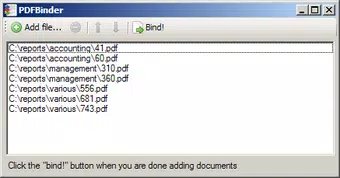
- Easy PDF Merging: Users can combine any number of PDF files with minimal effort. The drag-and-drop interface allows for intuitive file addition, enabling seamless compilation of documents from various sources.
- Cost-Effective Solution: As a free application, PDFBinder offers essential PDF merging capabilities without subscription fees or in-app purchases, making it an economical choice for individuals and small teams.
- User-Friendly Interface: The app features an intuitive layout that ensures smooth navigation for users of all experience levels, minimizing the learning curve typically associated with document management tools.
- All-in-One PDF Management: Beyond merging, the app supports the integration of scanned documents and web-printed files, allowing users to create comprehensive digital archives in a single file.
- Workstation Compatibility: Designed for use on desktop and laptop systems, PDFBinder ensures compatibility with existing workflows, enabling efficient document handling across different environments.
For example, a student preparing a research report can use PDFBinder to merge journal articles, notes, and diagrams into one unified document. Similarly, a project manager might compile meeting minutes, status updates, and deliverables into a single PDF for sharing with stakeholders. These real-world applications highlight the app’s practical value in everyday digital tasks.
Interface, UX & Performance
The user interface of PDFBinder is designed with clarity and simplicity in mind. The layout emphasizes essential functions, placing the core merging tools front and center for immediate access. Visual elements are minimal but functional, reducing distractions and allowing users to focus on their document tasks.
Navigating through the app is straightforward, with a linear flow that guides users from file selection to final output. The drag-and-drop functionality enhances usability, particularly for those unfamiliar with advanced software. Although the developer did not list formal performance metrics, the app’s lightweight nature—only 2.1 MB in size—suggests efficient resource usage and fast loading times.
Performance across different device categories appears to be consistent, given the app’s minimal footprint and long-standing compatibility. Responsiveness is likely optimized for basic operations, ensuring smooth handling of small to moderately sized PDF files. Stability is implied by the app’s continued availability and use since 2012, though specific crash reports or update frequency were not disclosed.
Platform Compatibility & Technical Requirements
PDFBinder is available on the Android platform, making it accessible to a wide range of users with Android-based devices. The current version is 1.1, with a file size of 2.1 MB, indicating a lightweight installation that does not strain device storage.
The developer did not specify minimum OS requirements, nor did they list compatibility details for specific Android versions. As such, users should ensure their device meets general Android standards for app installation. The absence of detailed technical specifications means that compatibility with older or newer Android systems remains unconfirmed.
Pros and Cons
Pros
- Free to download and use with no hidden costs
- Simple, intuitive interface suitable for all skill levels
- Efficient PDF merging with drag-and-drop functionality
- Lightweight size, ideal for devices with limited storage
- Supports integration of various PDF sources, including scans and web prints
Cons
- Developer did not provide detailed system requirements
- Specific performance data or optimization details were not disclosed
- No information on update frequency or future development plans
- Limited to Android platform; no iOS or desktop version confirmed
- Functionality appears focused solely on merging; no mention of editing or conversion features
FAQ
Is PDFBinder safe to download and install?
Yes, the app is available through official Android channels and has been in use since 2012. As a free utility, it does not require sensitive permissions, reducing potential security risks.
Can I use PDFBinder on iOS devices?
The app is currently available only on Android. No official iOS version has been released or confirmed by the developer.
Does PDFBinder support large PDF files?
While specific file size limits were not disclosed, the app’s lightweight design suggests it is best suited for small to medium-sized documents. Performance with very large files may vary depending on device capabilities.
How often is PDFBinder updated?
The developer did not provide information on update frequency. The current version is 1.1, released in 2012, indicating minimal recent changes.
Can I edit or convert PDFs using PDFBinder?
Based on available information, the app focuses primarily on merging PDFs. There is no indication that it supports editing, converting, or splitting PDF files.
Final Thoughts
PDFBinder stands out as a dependable, no-frills tool for users seeking a simple way to merge PDF documents. Its free access, minimal size, and straightforward interface make it an excellent choice for individuals and teams who prioritize efficiency over advanced features. While it lacks modern enhancements like cloud integration or file conversion, its core functionality remains effective and relevant.
For those managing multiple PDFs on a daily basis—whether for academic, professional, or personal use—PDFBinder offers a practical solution without the cost or complexity of full-featured software. Its long-standing presence in the Android ecosystem reflects reliability and user satisfaction over time.
Download PDFBinder now


